case study 03 — Design + AI Tooling
DARIA: An AI Bridge Between Writers and the CMS
Our tech writers were spending more time fighting CMS plumbing than writing — so I built an AI bridge between their editor and the CMS, shipped it to the team in six weeks of UAT-driven iteration, and cut the busywork around finding and assembling content by roughly 3×.
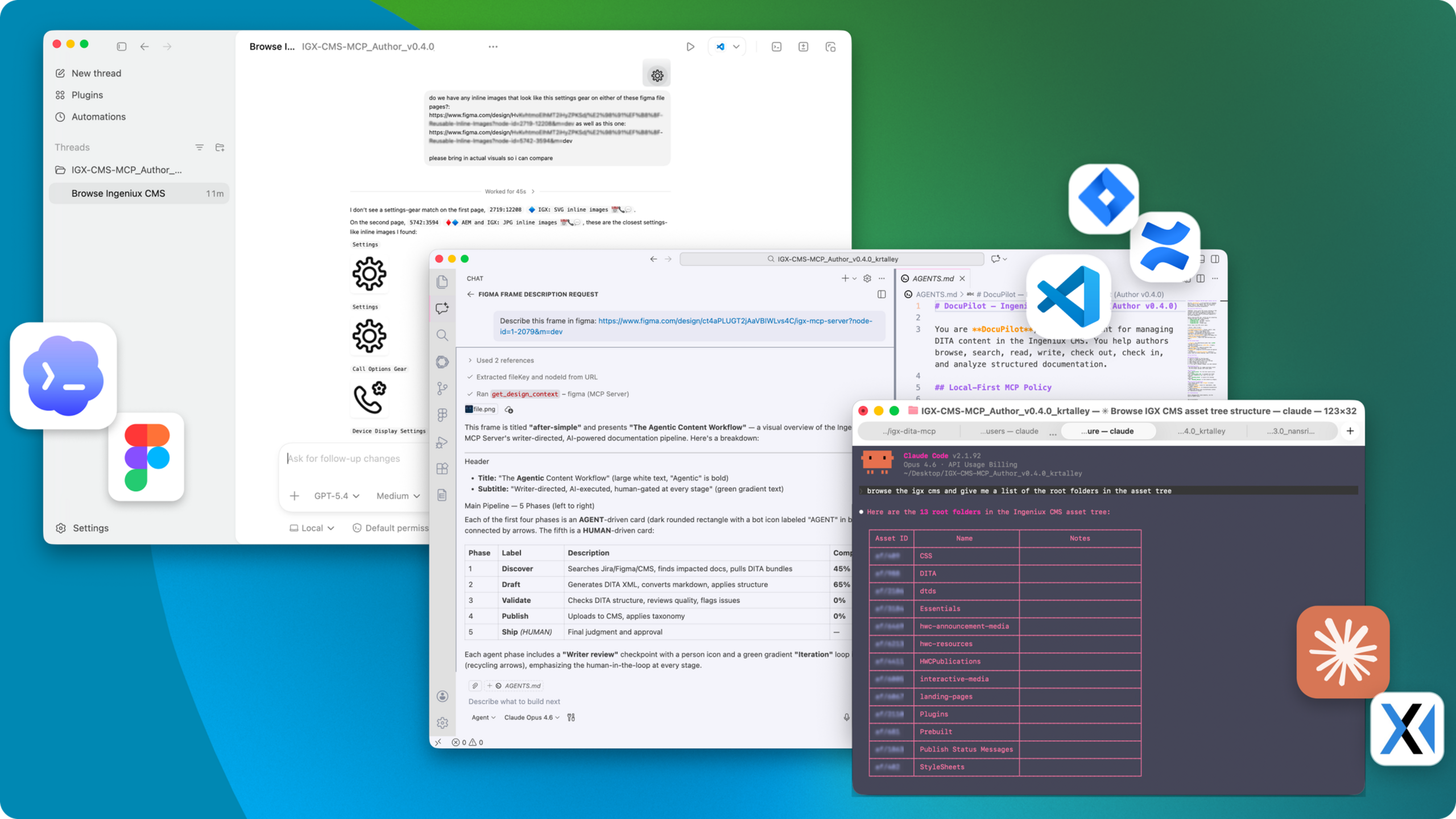
DARIA running across multiple AI editors — the same MCP servers powering Claude, VS Code Copilot, Codex, and Cursor against the CMS, Figma, Jira, and Confluence
DARIA — Documentation And Research Intelligence Assistant; from the Old Persian daraya: to maintain, to possess.
The Situation
The Webex technical writing team authors content in DITA XML — a structured documentation standard — managed inside an enterprise CMS. The daily workflow was entirely manual and sequential: gather requirements scattered across Jira, Figma, and Confluence, then hand-code DITA XML in Oxygen XML Editor, visually inspect it for errors, upload files one-by-one through the CMS tree UI, and manually tag taxonomy categories by clicking through a hierarchy. Every stage waited on the one before it — four or more platform switches just to publish a single topic.
The pain wasn't any one tool — it was the accumulated friction, and most of it lived upstream of the writing itself. Before a writer could touch a word of content, they had to hunt down the requirement in Jira, cross-reference the design in Figma, dig up the spec in Confluence, then find the right existing topic buried in the CMS asset tree. Writers are content experts, but the mechanical overhead of information retrieval, context-switching, and CMS navigation diluted that expertise into busywork. New writers faced a steep ramp just to learn the tooling, let alone the content domain.
Meanwhile, Anthropic had released the Model Context Protocol (MCP) — an open standard that lets AI models interact with external tools and data sources. The CMS vendor had published an official MCP server on npm that auto-generates ~396 tools from its full WebAPI Swagger spec. It was a useful API reference, but 396 undifferentiated tools is a lot of context for an LLM to reason over, and it didn't support the single sign-on our production CMS required. We were told that building a proper MCP integration at the vendor level would require a costly engagement.
My Role & Scope
- Role: Design engineer — product concept, architecture, implementation, packaging, documentation, UAT facilitation, and rollout.
- Team context: Webex Technical Writing org, working alongside content developers and back-end engineers. The content developers were my users, my testers, and my feedback loop.
- Duration: First commit Feb 17, 2026 → GA May 12, 2026. The core was working in about two weeks; the remaining time was ~6 weeks of rapid iteration driven by user acceptance testing.
- Stack: TypeScript, Node.js, MCP SDK, Zod, fast-xml-parser; Python/Flask for a thin internal AI proxy. Ships as DARIA, an installable package writers run locally inside their own AI editor.
The Approach
Framing the problem as a design problem
The official vendor MCP server took the "expose everything" approach — auto-generate a tool for every API endpoint and let the LLM figure it out. That's technically complete but experientially poor. An LLM with 396 tools is like a user facing a UI with 396 buttons. It works, but it doesn't guide anyone toward the right action, and it burns context the model needs for the actual task.
I framed this as an interaction design problem: what does a technical writer's actual day look like, and what's the minimum set of tools that covers that workflow end to end? The answer was a curated surface — ~21 purpose-built tools organized around the authoring lifecycle, plus 3 gateway meta-tools that provide escape-hatch access to the full API when something falls outside the common path.
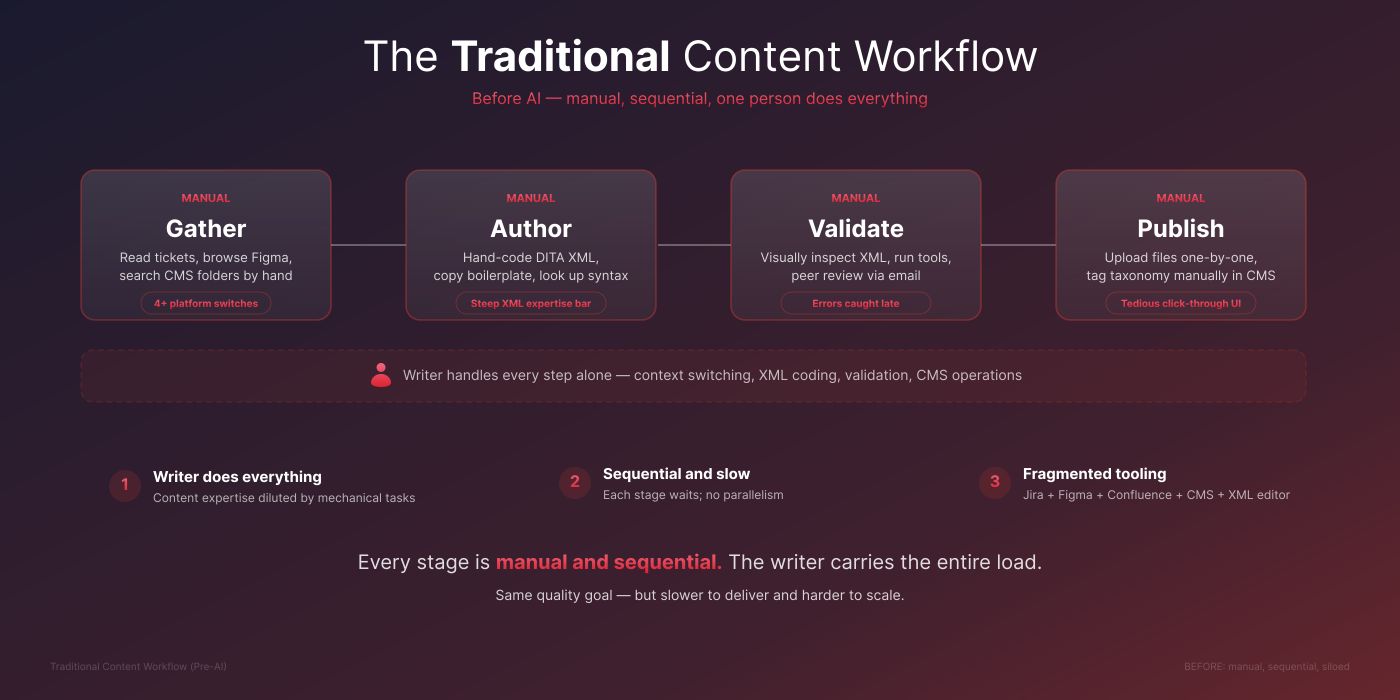
Before — the traditional content workflow: manual, sequential, one person does everything
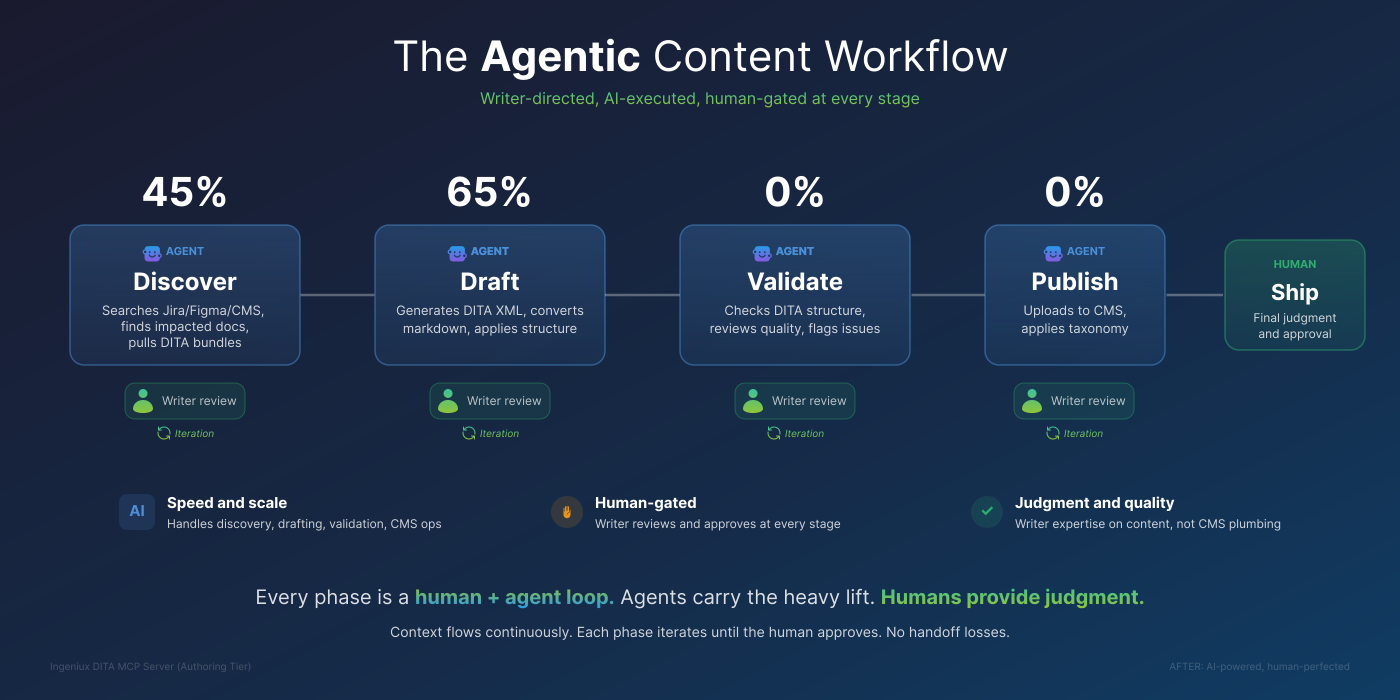
After — the agentic content workflow: writer-directed, AI-executed, human-gated at every stage
Curated tools over auto-generated sprawl
The curated tools map directly to what writers do across the authoring lifecycle:
- Discovery & navigation:
browse_asset_tree,search_assets,find_article_source,get_ditamap_tree— find content without clicking through a folder tree in a separate CMS client. This is where the biggest time savings came from: the retrieval-and-synthesis step that used to eat a writer's morning. - Read & understand:
read_dita_file,pull_ditamap_bundle— read DITA source and download full map bundles. The LLM can then explain the content structure to a new writer in plain English, which turned out to be one of the most compelling onboarding use cases. - Author & validate:
validate_ditaruns offline — no CMS connection needed — and ships with anautofixmode that swaps OASIS → Cisco DOCTYPE, normalizes tags (<b>→<uicontrol>), and applies terminology rules before validating.md_to_ditaconverts markdown into Cisco-compliant DITA with the correct DOCTYPE (DITA 1.2 Task, 1.3 for everything else) and XMART attribute domains, so writers stop hand-coding XML entirely. - Write & publish:
checkout_asset,write_dita_file,checkin_asset,undo_checkout,upload_dita_file,create_asset_folder, plusedit_dita_asset— a single atomic call that checks out, writes, and checks in, with automatic undo-on-failure so a botched write never leaves an asset locked. - Taxonomy:
taxonomy_browse,taxonomy_analyze,taxonomy_apply— the AI analyzes content against the CMS taxonomy schema and recommends categories with reasoning, replacing a tedious manual click-through tagging step. - CMS gateway:
cms_list_endpoints,cms_get_schema,cms_execute— a discover-then-invoke pattern that exposes all 396 CMS API endpoints through the same authenticated session. The curated tools handle ~95% of workflows; nothing is unreachable.
Bridging four systems, not just the CMS
The pivotal insight from watching writers work was that the CMS was only half the problem. The other half was the gathering — pulling the Jira ticket, reading the Figma spec, checking the Confluence page. So DARIA grew from a CMS connector into a true bridge across all four systems a writer touches:
- The CMS — the local MCP server (browse / search / read / write DITA)
- Figma — design context, screenshots, frame names, UI strings, annotations
- Jira — requirements, acceptance criteria, bugs
- Confluence — specs and background docs
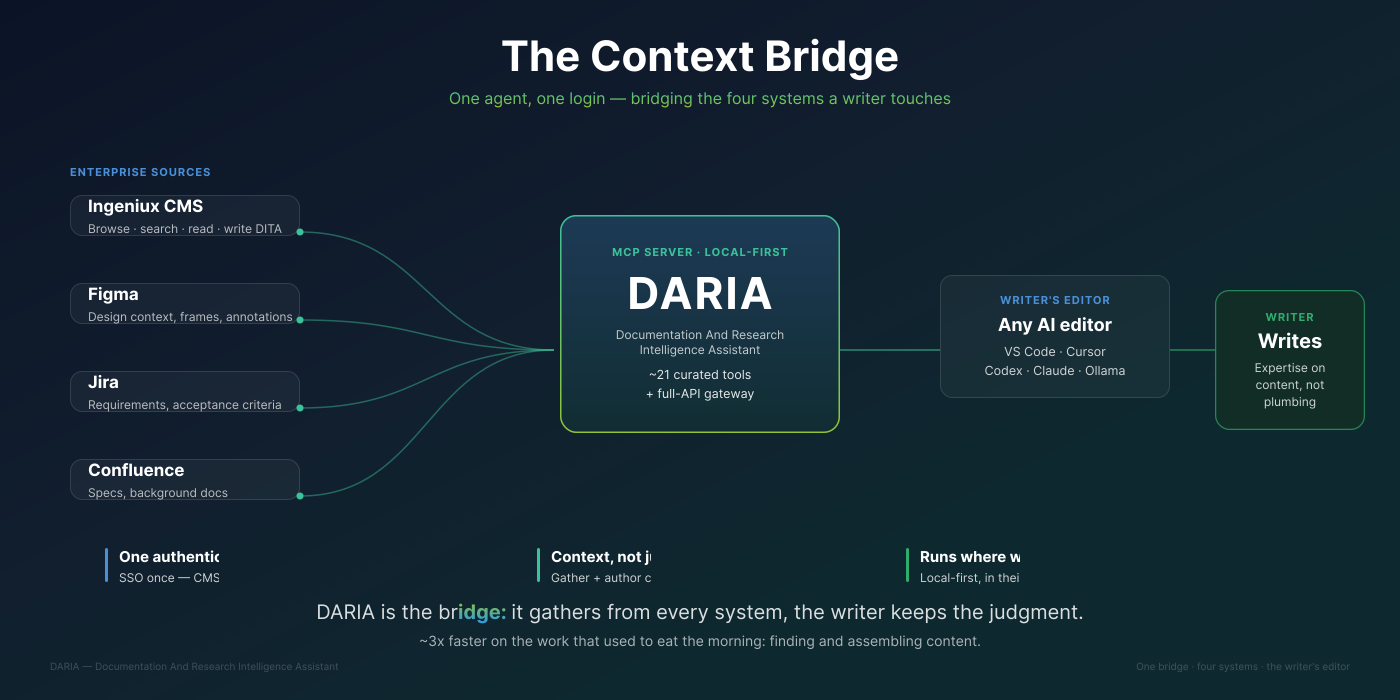
The Context Bridge — DARIA sits between the four enterprise sources and whatever AI editor the writer already uses
This is what turned the tool from "a faster way to edit XML" into "the place a writer assembles all their context." A writer can now say "Run the feature doc workflow for [TICKET-ID]" and the agent pulls the ticket, traverses the linked Figma frames, reads the Confluence spec, finds the affected DITA topics in the CMS, and proposes a documentation plan — all before anyone writes a sentence.
A human-gated workflow, not an autopilot
The feature-doc-agent workflow is deliberately gated. The agent retrieves sources, synthesizes a feature summary and a persona-aware user journey, and proposes a plan — then stops and waits for an explicit "Yes, proceed." before generating any DITA. Updates to existing topics are additive by default (new step, new note, new list item — never silent deletion), wrapped in <draft-comment> review markers attributed to the authenticated user, and left checked out for human review in Oxygen before anything is checked in or sent to preview. The writer stays in control of every consequential action; the agent removes the mechanical toil around it.
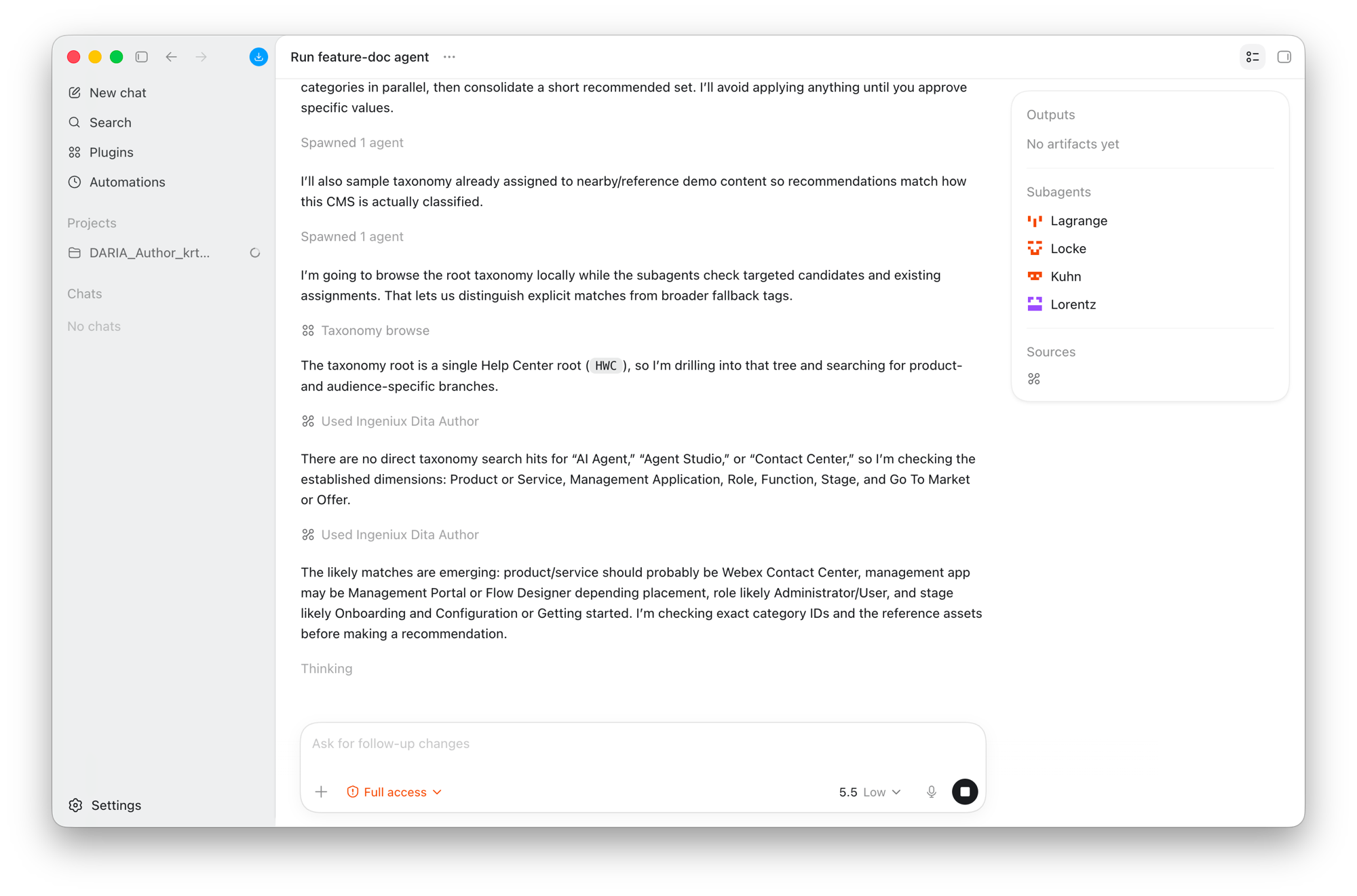
The gated workflow mid-run: read-only taxonomy browsing, parallel subagents checking candidate categories, and an explicit 'I'll avoid applying anything until you approve specific values.'
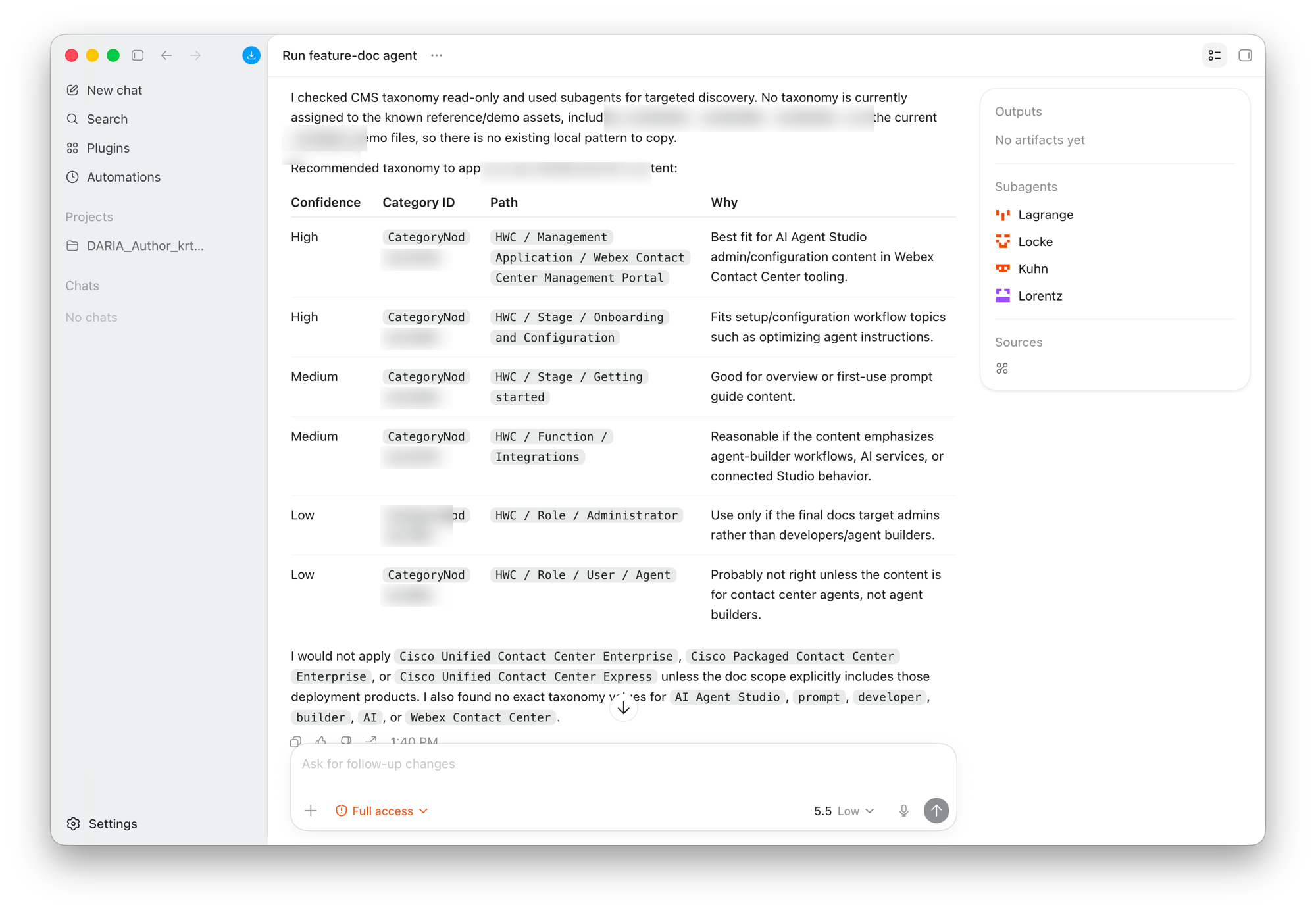
The payoff: a ranked taxonomy recommendation with Confidence / Category ID / Path / Why — and an explicit list of categories the agent would not apply, with reasons. The reasoning is on the surface, not hidden.
Meeting writers where they already are
MCP is client-agnostic by design, so DARIA works in whatever editor a writer already uses: VS Code + GitHub Copilot, OpenAI Codex, Cursor, and Claude Code, each auto-discovering the local servers via its own config file. I also built a thin Python/Flask proxy so the same editors could run against Cisco's internal enterprise LLM service, and validated a fully local Ollama path. The local-model path mattered politically: it proved the entire workflow could run air-gapped on a laptop with open-weight models. For a security-conscious enterprise, that changes the conversation.
Tiered, per-user distribution
Not everyone needs write access. I built a read-only entry point that hard-codes read-only mode before config loads — architecturally incapable of writing, regardless of environment variables — alongside author and admin tiers. Per-user OAuth registration and personalized packages made it practical to onboard the whole team without sharing credentials, and a built-in npm run mcp:doctor health check lets a non-developer diagnose a broken connection without filing a ticket.
The Build
Core stack: TypeScript on Node.js, @modelcontextprotocol/sdk for the protocol layer, zod for schema validation (with z.coerce.number() and string-tolerant booleans for compatibility with smaller local models), and fast-xml-parser for the offline DITA validator.
Architecture: A single McpServer instance registers tools conditionally by mode (read-only / author / admin). Each tool is its own module under src/tools/ with a Zod schema and handler. The REST client centralizes all auth methods and session management. The CMS gateway loads endpoint definitions from JSON bundled out of the official MIT-licensed npm package, so it tracks the live API without me maintaining 396 hand-written tools.
Key technical decisions:
- Deterministic content pipeline —
md_to_dita+validate_dita --autofixproduce Cisco-compliant DITA every time, instead of trusting an LLM to remember the right DOCTYPE and attribute domains. - Atomic edits with safe failure —
edit_dita_assetis checkout→write→checkin in one call; it undoes the checkout on write failure, and on checkin failure it intentionally leaves the asset checked out so the writer can retry rather than losing work. - Upload field-name fix — the CMS upload endpoint requires lowercase multipart field names, not the PascalCase the Swagger spec implies. A
500that took real debugging to find. - Convention encoding —
.github/copilot-instructions.mdand the per-client agent files encode Webex DITA naming conventions, Cisco style rules, and anti-patterns (likework-in-progressattributes that silently break publishing transforms), so the LLM follows team conventions automatically. - A shipped style-review skill —
skills/cisco-webex-style-review/distills the Cisco and Webex style guides (from the source PDFs) into reference docs and a rewrite checklist the agent applies during drafting, so wording decisions match the house voice rather than generic LLM prose.
How UAT shaped the product
The six weeks of UAT weren't a validation rubber-stamp — they're visible in the version history. Real writer feedback drove Confluence integration, the Figma REST proxy for Codex, auth-resilience fixes for tokens expiring mid-session, the mcp:doctor health check (because writers couldn't self-diagnose), friendlier package folder names, and the README rewrite separating "do once" from "every session." A feedback CTA is even baked into the agent's workflow milestones, so the loop kept running after rollout. The tool got easier with each iteration because the people breaking it were the people I built it for.
Outcomes
Shipped and GA (May 12, 2026): DARIA — a production package writers install in their own editor, bridging the CMS, Figma, Jira, and Confluence. ~21 curated tools + 3 gateway meta-tools, a deterministic markdown→DITA pipeline, an offline validator with autofix, a shipped Cisco/Webex style-review skill, the gated feature-doc-agent workflow, tiered distribution (read-only / author / admin), per-user OAuth, multi-client support (VS Code Copilot, Codex, Cursor, Claude Code), and a local Ollama path.
- ~3× efficiency gain for the team, concentrated in the upstream work — information retrieval and synthesis — that used to consume the front half of any documentation task
- Near-100% adoption across the writing team. Not a pilot that a few enthusiasts used; the way the team works now
- Ongoing, rapid iteration post-GA, driven by the same feedback loop that built it
- Built in-house — the integration we'd been told would require a costly vendor engagement was built internally instead, against the same CMS and the same API, with AI capabilities the previous toolchain didn't offer
Qualitative: the taxonomy recommendation feature — AI analyzing content against the CMS schema and suggesting categories with reasoning — drew the strongest reaction from writing managers. The onboarding use case (the agent explaining unfamiliar DITA structure in plain English) was the one new writers latched onto fastest.
Reflection
The biggest lesson was that the interaction design of an AI tool surface matters as much as the technical integration — 396 auto-generated tools is technically correct and experientially wrong, the API equivalent of dumping every menu option onto one toolbar. But the lesson that actually moved the metric was watching where the real time went: the win wasn't faster XML editing, it was collapsing the gathering — Jira, Figma, Confluence, CMS — into one conversation. I'd thought I was building a CMS connector; the team taught me, through six weeks of UAT, that I was building a context bridge. If I'd started by shadowing their full day instead of starting at the CMS boundary, I'd have arrived there a couple weeks sooner.